You are developing a real-time computer vision system to detect pedestrian locations for an driver-assist safety system. In this context, how is a "bounding box" defined and utilized?
Select an answer to reveal the explanation.
Short Explanation and Infographic
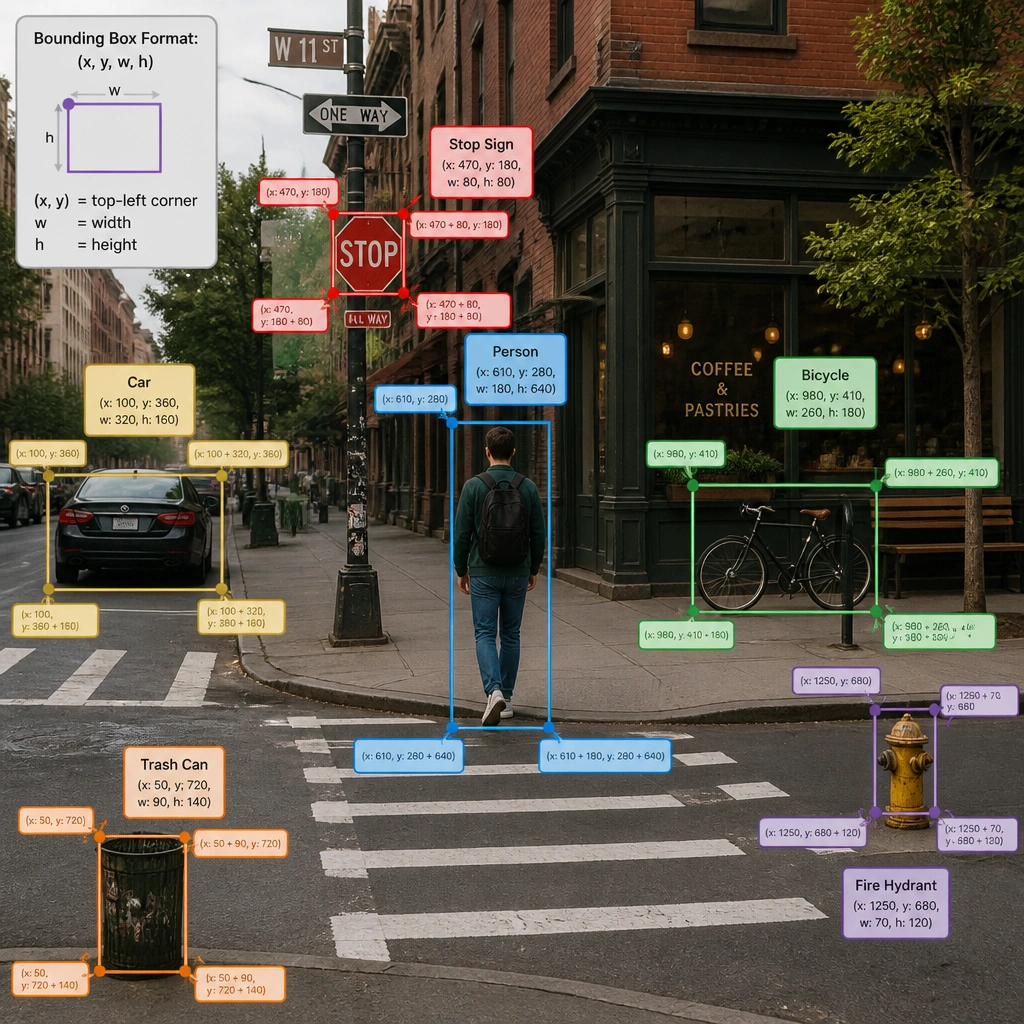
Imagine your boss walks in and says, 'We need our security cameras to spot whenever a forklift enters a restricted zone.' If your AI model just outputted 'Yes, forklift present,' that wouldn't help much. You need to know where it is. That's where a bounding box comes in. It's a simple rectangular border drawn around the detected object. In the code, it's represented by four numbers—like the X and Y coordinates of the top-left corner, plus the width and height. This lets the system pinpoint and display the exact location of the object. Go with Option D!
Full explanation below image
Full Explanation
In computer vision, tasks are generally categorized into image classification (identifying the class of the primary object in an image) and object detection (identifying the class and the spatial location of one or more objects). A bounding box is the standard method used in object detection to define an object's spatial location.
A bounding box is a rectangular border that encloses a single detected object in an image. Mathematically, it is defined using a coordinate system relative to the image pixels. The two most common coordinate formats are: 1. $(x_{min}, y_{min}, x_{max}, y_{max})$: Specifying the top-left and bottom-right corners. 2. $(x_c, y_c, w, h)$: Specifying the center coordinates of the box along with its width and height.
During model training, the network is trained using supervised datasets containing ground-truth bounding boxes manually labeled by humans. The model predicts both the object's class probability and the bounding box coordinates. The loss function (such as Smooth L1 Loss or Complete Intersection over Union Loss) measures the error between the predicted coordinates and the ground-truth coordinates to guide gradient updates.
Let's review the incorrect options: - Option A refers to image normalization, which is a mathematical scaling of pixel values (e.g., dividing by 255) to standardize input data, not a spatial box. - Option B refers to convolutional kernels (filters), which are mathematical arrays used for feature extraction. - Option C refers to data augmentation techniques like cropping, rotation, or shearing, which are used to expand the training dataset.
Remember for the exam: A bounding box is the coordinate-defined rectangle that isolates and indicates the physical location of a detected object within a digital image.