During the training phase of a large deep learning model on a multi-GPU cluster, a system engineer notices that the high-end GPUs are frequently sitting idle between training steps. The storage array is built on high-speed NVMe SSDs, but the host CPU is struggling to keep up with loading, decoding, and preprocessing the massive image dataset. Which action will most effectively eliminate this preprocessing bottleneck and improve GPU utilization?
Select an answer to reveal the explanation.
Short Explanation and Infographic
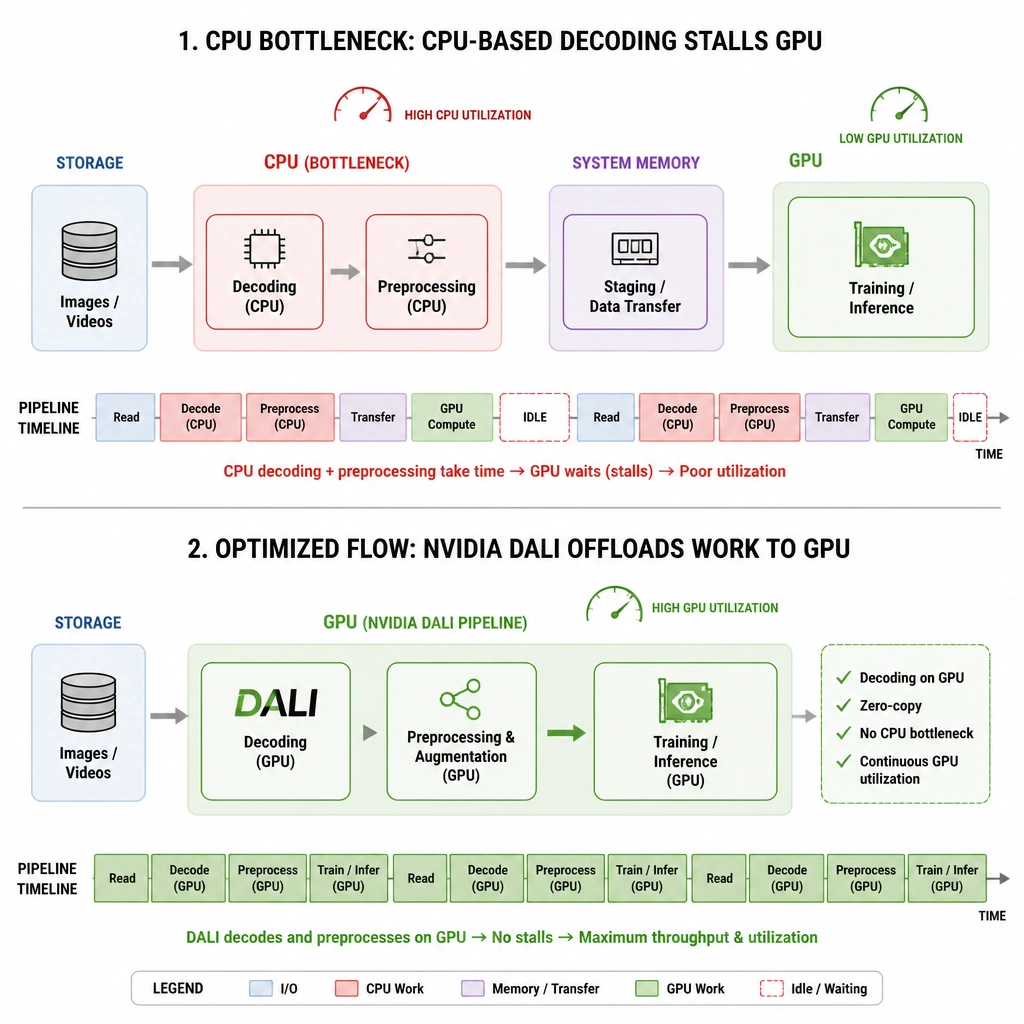
Check this out: you can buy the fastest NVMe storage on the market, but if your CPU is choking on decoding images or scaling datasets, your GPUs are still going to sit around twiddling their thumbs. That's a classic bottleneck! To fix this, you need to use NVIDIA DALI (Data Loading Library). DALI takes that heavy lifting—like JPEG decoding, resizing, and data augmentation—and offloads it directly onto the GPU. This keeps the data pipeline screaming fast and keeps your GPUs fully fed. Trust me, keeping those GPUs busy is the name of the game if you want to finish training before next year!
Full explanation below image
Full Explanation
NVIDIA DALI (Data Loading Library) is specifically designed to accelerate data pipelines for deep learning by offloading data preprocessing (such as decoding, resizing, cropping, and color space conversions) to the GPU. When GPUs are idling (starving for data), the bottleneck is almost always CPU-bound preprocessing latency. By optimizing the pipeline with DALI, data preparation runs in parallel with model training on the GPU, resolving the bottleneck and maximizing GPU utilization. - A is incorrect because the issue is not storage I/O throughput (the system already uses fast NVMe storage); rather, the bottleneck is CPU processing speed during the decode and transformation phases. - B is incorrect because switching to traditional HDDs would drastically reduce read speeds, exacerbating the data starvation issue. - C is incorrect because disabling RAPIDS or shifting data processing back to the CPU would increase the workload on the CPU, making the preprocessing bottleneck even worse and further lowering GPU utilization.