You are troubleshooting a distributed deep learning training job running on an 8-GPU server connected via high-speed NVLink. You notice that the individual GPU utilization is hovering around 30%, and the training throughput is far below expectations. Assuming there are no storage read bottlenecks, which configuration adjustment is most likely to saturate the GPU cores and maximize training efficiency?
Select an answer to reveal the explanation.
Short Explanation and Infographic
Pay close attention here, because this one bites people in production all the time. You spend a fortune on a high-end multi-GPU server, fire up your training script, and check the performance monitor only to find your GPUs are sitting at 30% utilization. What gives? Think of it like this: your GPU is a massive commercial airliner. If you only put five passengers on it per flight, you're wasting a ton of capacity and money. If your mini-batch size is too small, the GPU processes the data so fast that it spends most of its time waiting for the next batch or waiting to sync weights with the other GPUs over NVLink. By cranking up the batch size, you fill the GPU's memory and saturate the parallel cores with work, keeping them busy and efficient. Just watch your VRAM, because if you go too high, you'll hit an Out-Of-Memory error!
Full explanation below image
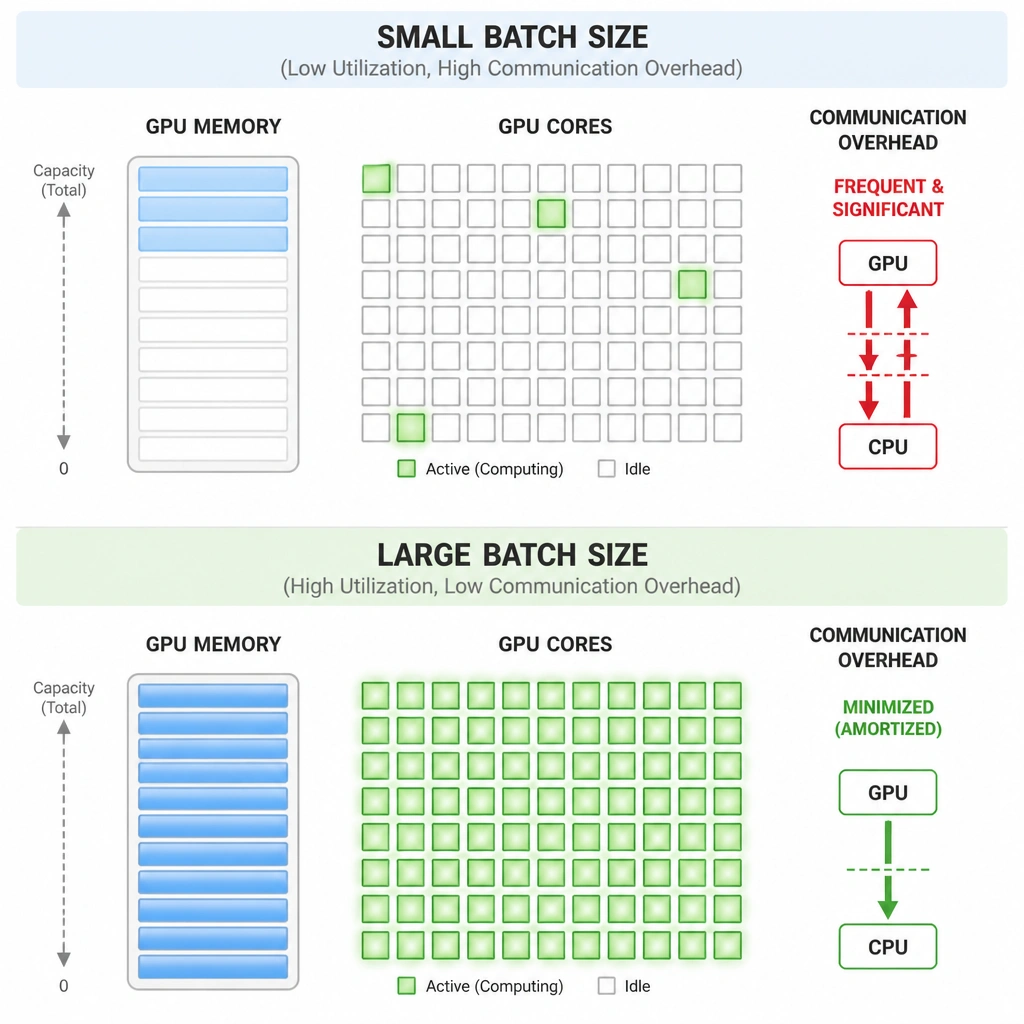
Full Explanation
Underutilization of GPUs during deep learning training is a common bottleneck, often caused by feeding the parallel processors insufficient data. GPUs achieve high computational efficiency by executing operations on thousands of execution threads concurrently. 1. Saturating CUDA Cores: When the mini-batch size is too small, the GPU cores finish their calculations almost instantly, and the system becomes bounded by overheads such as kernel launch latency, host-to-device data transfers, and inter-GPU synchronization. By increasing the batch size (the number of training samples processed in a single forward/backward pass), you provide enough work to keep the GPU's vector units and Tensor Cores fully saturated. 2. Amortizing Communication Costs: In a multi-GPU setup, gradients must be synchronized across devices at the end of each step. A larger batch size means the GPUs spend more time performing computation relative to the time spent communicating, which improves the compute-to-communication ratio.
Why Distractors are Incorrect: A) Transitioning the training job to run over standard PCIe slots instead of NVLink: NVLink provides much higher bandwidth (up to several times faster than PCIe) for inter-GPU communication. Disabling NVLink and falling back to PCIe would worsen communication bottlenecks and decrease overall GPU utilization. B) Disabling mixed-precision training to enforce strict FP32 calculations: Disabling mixed-precision actually increases the computational workload per calculation, but it doesn't solve the core issue of underutilization due to small batches. In fact, mixed precision (FP16/BF16) is a best practice to speed up training by using Tensor Cores, and it allows for larger batch sizes due to reduced memory footprint. * D) Decreasing the learning rate to slow down gradient descent updates: The learning rate is an optimization hyperparameter that determines how far weights are adjusted during gradient updates. It has no impact on hardware utilization, memory usage, or how data is parallelized across GPU cores.