You are hosting several GPU-accelerated virtual machines (VMs) in your private cloud. One VM is running a BERT model but is completing training epochs at half the speed of the other identical VMs, despite having the exact same physical GPU hardware allocated. Which configuration error is most likely preventing the VM from executing workloads directly on the hardware at bare-metal speeds?
Select an answer to reveal the explanation.
Short Explanation and Infographic
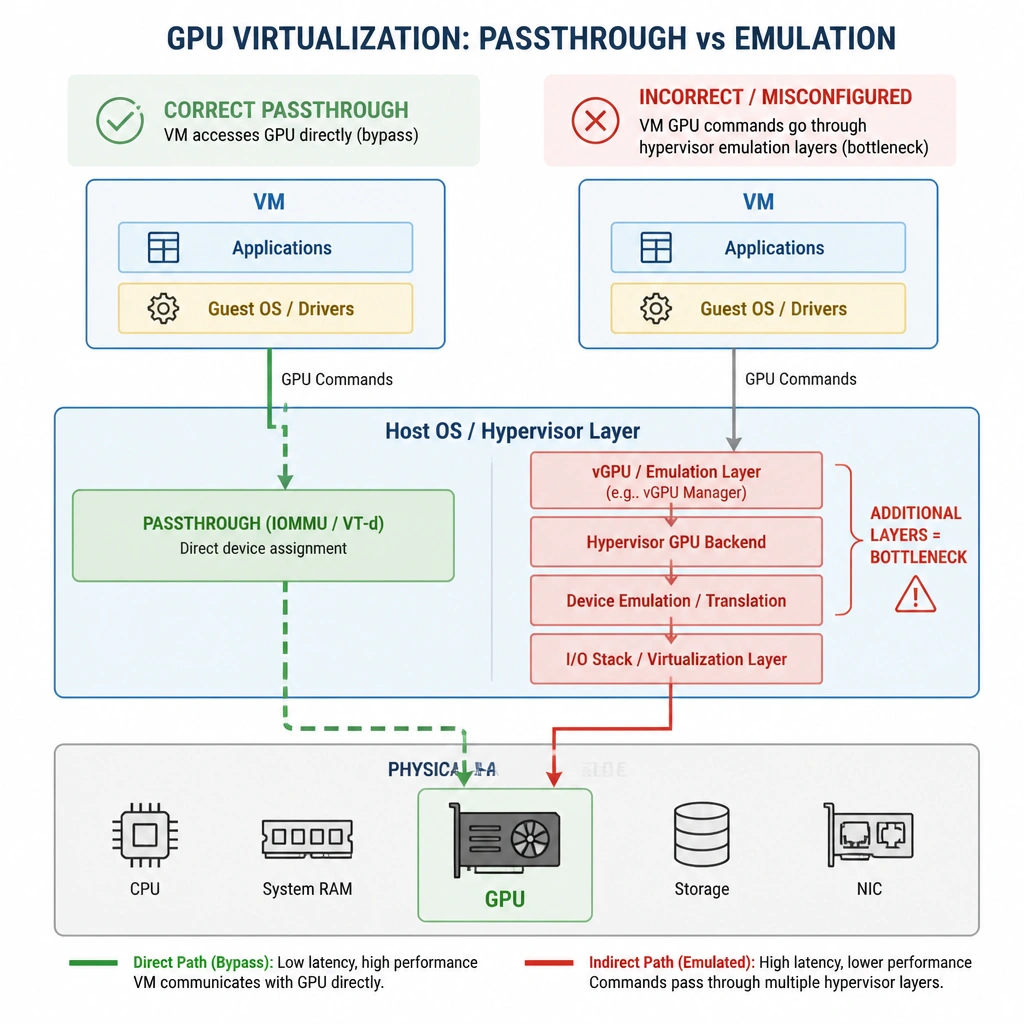
Imagine your boss walks in and says, 'Why is VM-3 running our training runs twice as slow as VM-1 and VM-2?' You check the specs, and they look identical on paper. Here's the trap: in virtualized environments, if your GPU passthrough settings aren't set up perfectly, the VM won't have direct, raw access to the PCIe hardware. Instead of letting the VM talk directly to the GPU's registers (what we call discrete device assignment or passthrough), the hypervisor has to jump in and translate the commands. That middle-man translation kills your performance! Once you configure proper PCIe passthrough, the VM bypasses the hypervisor completely and runs at bare-metal speed. Got it? Sweet. Let's keep rolling.
Full explanation below image
Full Explanation
In virtualized environments, obtaining near-native (bare-metal) GPU performance requires bypassing the virtualization layer as much as possible. This is achieved using PCI Passthrough (also known as Direct Device Assignment), which allows a virtual machine to have exclusive, direct access to a physical PCIe device (the GPU). If GPU passthrough is misconfigured (Option B), the virtual machine may suffer from high hypervisor intervention overhead during memory copies and kernel launches, or it might fall back to software-emulated rendering, severely limiting performance. Proper configuration requires enabling IOMMU (Intel VT-d or AMD-Vi) in the BIOS/UEFI, configuring the hypervisor to release the GPU, and binding the guest VM to the physical PCIe address. An incorrect framework version (Option A) typically causes compatibility errors or execution crashes rather than a consistent 50% performance drop. Disk space limitations (Option C) would cause write failures or swapping rather than slow GPU execution. Management network congestion (Option D) affects remote administration but does not impact local GPU computation. Thus, misconfigured hypervisor passthrough settings are the root cause of the performance bottleneck.