You deploy an identical PyTorch model on virtual machine instances with identical NVIDIA A100 GPU counts and CPU allocations across two different public cloud providers. However, benchmarking shows that Cloud Provider A achieves 20% higher training throughput than Cloud Provider
Select all correct answers, then click Submit.
Short Explanation and Infographic
Here's the deal: you've set up identical hardware on two different clouds, run your benchmarks, and one is significantly faster. What gives? Many engineers automatically assume the slower cloud is throttling their hardware or using cheap chips. But in the real world, the culprit is almost always the software stack. Different cloud providers build their VM templates with different versions of the Linux kernel, GPU drivers, CUDA libraries, and container runtimes. One provider might have optimized their virtual machine images specifically for AI workloads, with fine-tuned PCIe mapping and shared memory settings, while the other is using a generic hypervisor setup. Trust me, the software layer sitting between your code and the metal makes a massive difference in throughput. Always check your driver and CUDA versions first!
Full explanation below image
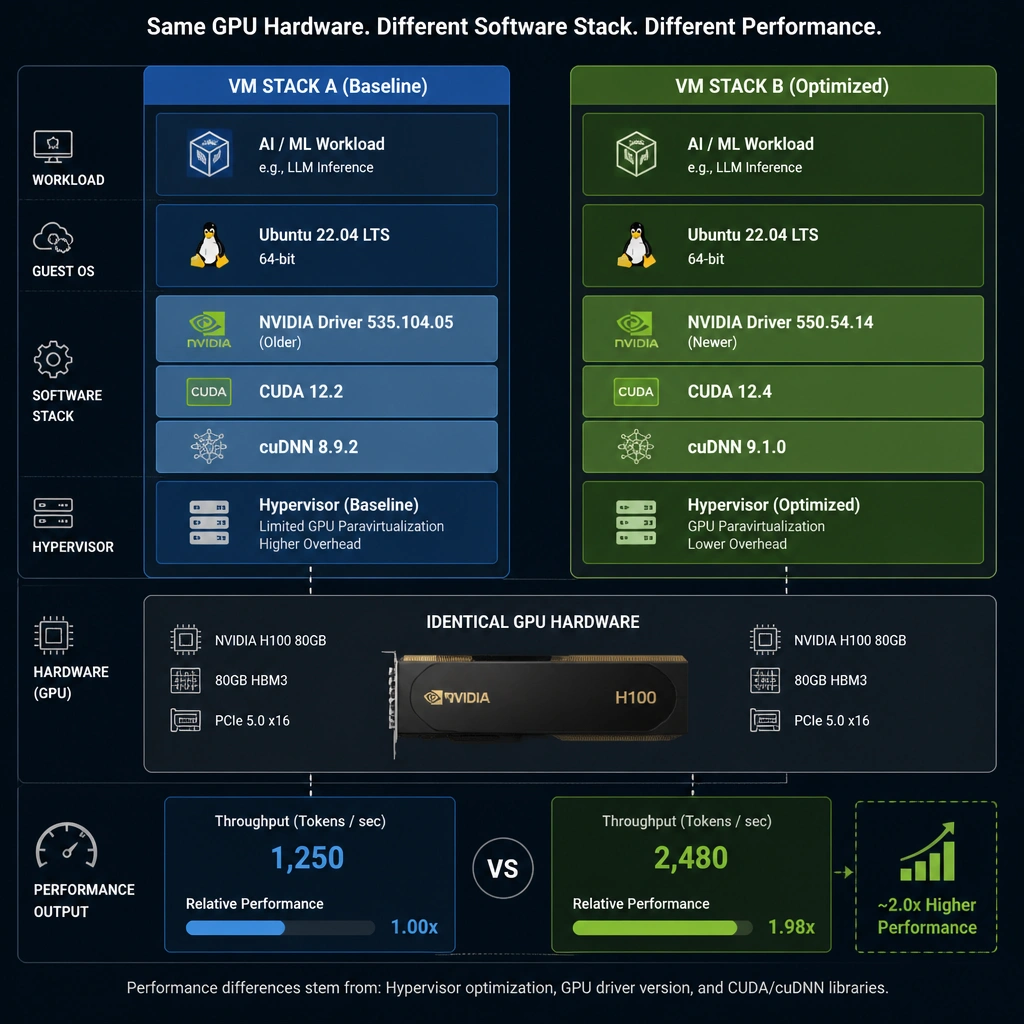
Full Explanation
When deploying GPU-accelerated workloads across different cloud service providers (CSPs), performance discrepancies can occur even when the hardware specifications (GPU model, vCPU count, RAM) appear identical. Assuming network and storage performance are excluded, the primary cause of these differences is variations in the virtualization hypervisor and the underlying software stack.
The software stack for accelerated computing is complex, consisting of the host operating system kernel, virtualization layers (hypervisors), GPU drivers, the CUDA Toolkit (runtime and compiler), cuDNN (deep learning libraries), and container runtimes (such as NVIDIA Container Toolkit). Cloud providers configure and maintain these components differently: 1. Hypervisor and Hardware Abstraction: Some providers use highly optimized hypervisors with direct PCIe pass-through (SR-IOV) that minimize virtualization overhead, while others may have higher overhead or inefficient CPU-GPU memory mapping (e.g., topology-unaware placements). 2. Software Stack Versions: A VM image on Cloud A might use a newer GPU driver and cuDNN version that includes optimizations for specific deep learning operations, resulting in higher execution speed compared to Cloud B running older drivers. 3. System-Level Tunings: Settings like CPU governor configurations, PCI-Express Access Control Services (ACS) configurations, and NUMA node bindings greatly affect latency and GPU-CPU communication efficiency.
Let's review the incorrect options: Consumer-grade GeForce drivers: Cloud providers run enterprise-grade virtualization and hardware (e.g., A100, H100) which are not supported by consumer GeForce drivers; they require NVIDIA datacenter drivers. Silicon lacking Tensor Cores: All versions of specific enterprise models like the NVIDIA A100 include Tensor Cores; there are no revisions of the A100 that lack them. * Ambient temperature/TDP: Data centers are kept within strict thermal envelopes. While cooling is critical, GPUs do not run above their maximum Thermal Design Power (TDP) limit indefinitely just because of lower ambient temperatures; their max clocks and power draw are governed by strict firmware limits.